|
<< Click to Display Table of Contents >> Unreleased Future Orders Report |
  
|
|
<< Click to Display Table of Contents >> Unreleased Future Orders Report |
|
The Unreleased Future Orders Report will display Unreleased Future Orders by the entered search parameters. These may be run for a specific patient account (on which the Future Orders were placed), or for All patients by leaving the Patient Account field blank.
Select Web Client > Report Dashboard > Unreleased Future Orders > Run
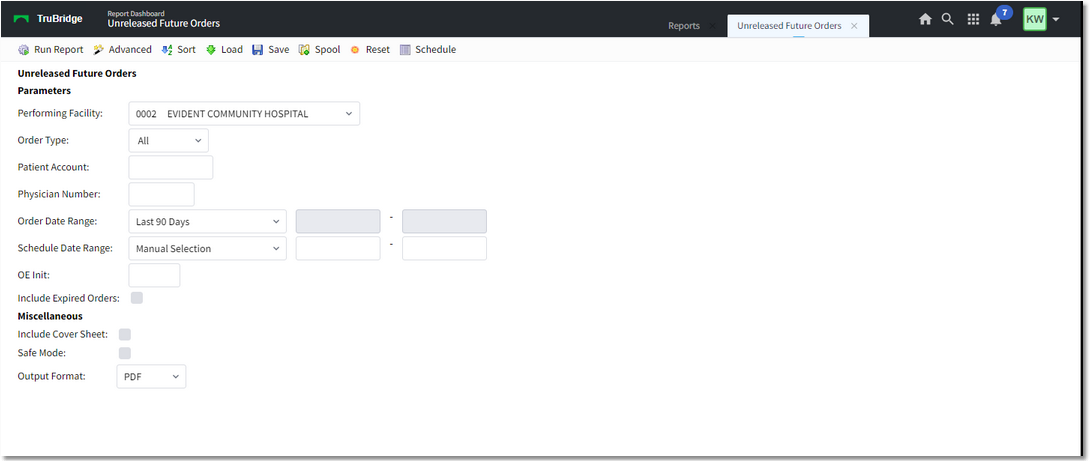
Unreleased Future Orders
Select the parameters you want to use to run the report:
•Performing Facility
•Order Type: Search by All or specific Ancillary, Pharmacy, or Nursing Orders
•Patient Account: Free text field, 8 characters
•Physician Number: Free text field, 6 characters
•Order Date Range: Manual selection or select a date range
•Schedule Date Range: Manual selection or select a date range
•OE Init: Initials of the Order Entry employee
•Include Expired Orders
Once you have selected the parameters, select Run Report to generate the report.
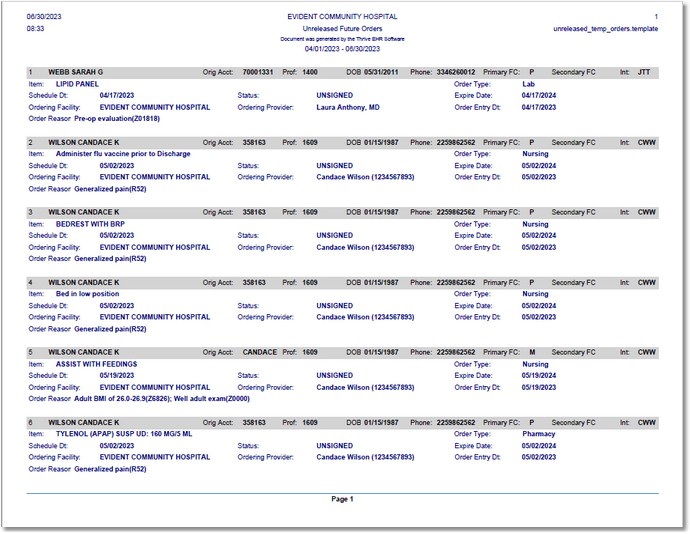
Unreleased Future Orders Report
The report will display by the Patient Name, grouping together all Future Orders based upon what has been entered for each Profile number.