|
<< Click to Display Table of Contents >> Released Future Orders Report |
  
|
|
<< Click to Display Table of Contents >> Released Future Orders Report |
|
The Released Future Orders Report will show Released Future Orders by the entered search parameters. These can be run for a specific patient account (on which the Future Orders were placed) or be run for All patients by leaving the Patient Account field blank.
Select Web Client > Report Dashboard > Released Future Orders
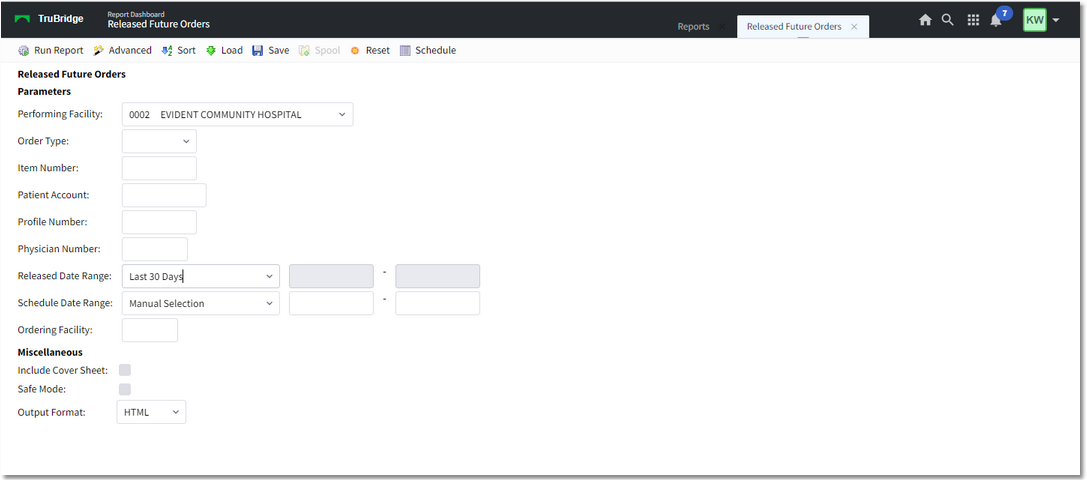
Released Future Orders
Select the parameters you want to use to run the report:
•Performing Facility
•Order Type: Search by All or specific Ancillary, Pharmacy, or Nursing Orders
oFilters: Filters for individual Ancillary Departments may be added by selecting the funnel icon, so that the user may search by specific ancillary department orders and exclude others.
•Search: 76 characters
oItem Number: Search by a specific Item Number for a Pharmacy or Ancillary Order from the Performing Facility's Item Master
oNursing Order Description: Search by entering the Nursing Order Description
•Patient Account: Free text field, 10 characters
•Profile Number: Free text field, 10 characters
•Physician Number: Free text field, 10 characters
•Released Date Range: Manual selection or select a date range
•Schedule Date Range: Manual selection or select a date range
•Ordering Facility: Facility Number (if ordered from a different facility than the Performing Facility)
Once you have selected the parameters, select PDF or CSV to generate the report.
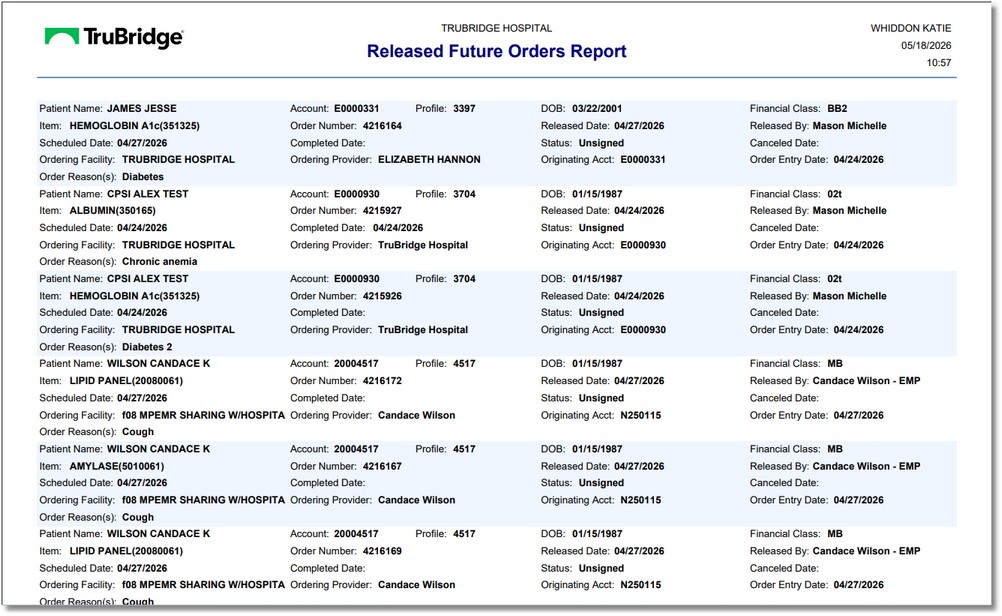
Released Future Orders Report
The Report will display each order in alternating colors. The orders will display with the following field information:
•Nursing Orders
oPatient Name
oAccount to which the orders were released
oPatient Profile number
oDate of Birth
oFinancial class
oOrder description
oStart Date
oOrdering Facility
oOrder Reasons(s)
oCompleted Date (looks to the status and only populates if an action has been added to complete it)
oOrdering Provider
oRelease Date
oStatus
oOriginating Account (This is the account upon which the orders were originally entered)
oReleased By
oDiscontinue Date
oOrder Entry Date
•Pharmacy Orders
oPatient Name
oAccount to which the orders were released
oPatient Profile number
oDate of Birth
oFinancial class
oItem description and item number
oSchedule Date is the Start Date
oOrdering Facility
oOrder Reasons(s)
oOrder Number
oOrdering Provider
oRelease Date
oStatus
oOriginating Account (This is the account upon which the orders were originally entered)
oReleased By
oDiscontinue Date
oOrder Entry Date
•Ancillary Orders
oPatient Name
oAccount to which the orders were released
oPatient Profile
oDate of Birth
oFinancial class
oItem description and item number
oSchedule Date
oOrdering Facility
oOrder Reasons(s)
oOrder Number
oCompleted Date
oOrdering Provider
oRelease Date
oStatus
oOriginating Account (This is the account upon which the orders were originally entered)
oReleased By
oOrder Entry Date
oCanceled Date
oCancel Reason
oCanceled By
oReturned to Queue (Y or N)