|
<< Click to Display Table of Contents >> Patient Orders |
  
|
|
<< Click to Display Table of Contents >> Patient Orders |
|
If nursing staff enters protocol, phone or verbal orders for a provider, the provider will access the Electronic Signature application to electronically sign the orders. Please note that protocol, phone and verbal orders are recorded as electronic (CPOE) orders because the provider must sign the orders electronically.
To sign orders, select the radio button to the left of the desired item or select the check box on the top to select all items in the list. Then select Sign to enter the passphrase.
Select Web Client > Tasks > E-Sign
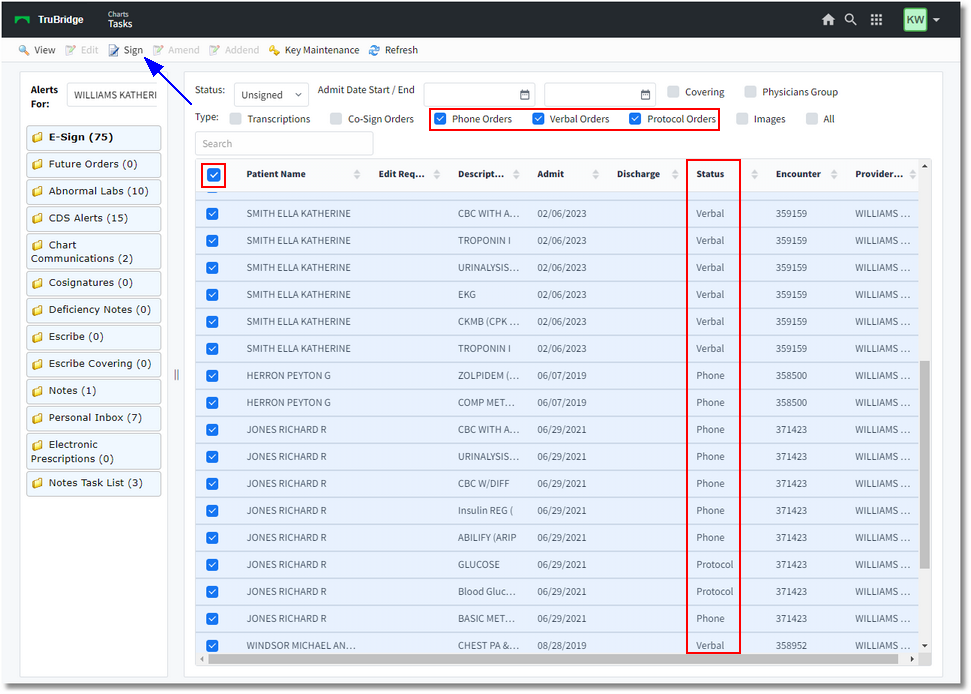
Electronic Signature
▪Patient: Displays the Patient Name.
▪Edit Required: N/A for orders
▪Description: Description of the Item that was ordered (test name, medication name, nursing order).
▪Admit: Displays the patient's admission date from the Registration and ADT screen.
▪Disc: Displays the patient's discharge date from the Registration and ADT screen.
▪Status: The selected Order Type: Phone, Verbal, Protocol, Cosign Verbal, Cosign Phone, DC Verbal, DC Phone (See below for Cosign).
▪Date/Time: This date will depend on the Description/Status of the order:
•Verbal/Phone/Protocol Orders: Date/Time the order was placed.
•Verbal/Phone/Protocol Cosign Orders: Date/Time the order was signed by the midlevel provider.
•CPOE Cosign Orders: Date/Time when the order was signed by the midlevel provider.
▪Provider: The name of the provider who initiated the Phone, Verbal, Protocol order, as well as any mid-levels that require a cosignature on an order or transcription.