|
<< Click to Display Table of Contents >> Order Set/List/Protocol Usage Report Report |
  
|
|
<< Click to Display Table of Contents >> Order Set/List/Protocol Usage Report Report |
|
The Order Set/List/Protocol Usage Report allows the user to search within a date range for which Sets, Lists, and Protocols have been utilized and the number of times they have been utilized. This will allow the administrators to know which ones are being used and which ones are not being used. The administrator with Tables > Clinical access may then Archive the unused sets, lists, and protocols.
To run the report:
1.From the Application Drawer, select Report Dashboard.
2.If the Order Set/List/Protocol Report is already listed on the Report Dictionary screen, double-click the report title or select it and select Run. If it has not yet been added to the Report Dictionary, proceed with step 3.
3.Select Add and search for Order Set/List/Protocol Usage Report.
4.Select the report and select Insert, or double-click the report title.
5.Select the report title from Report Dictionary. Double-click or select the title and select Run Report.
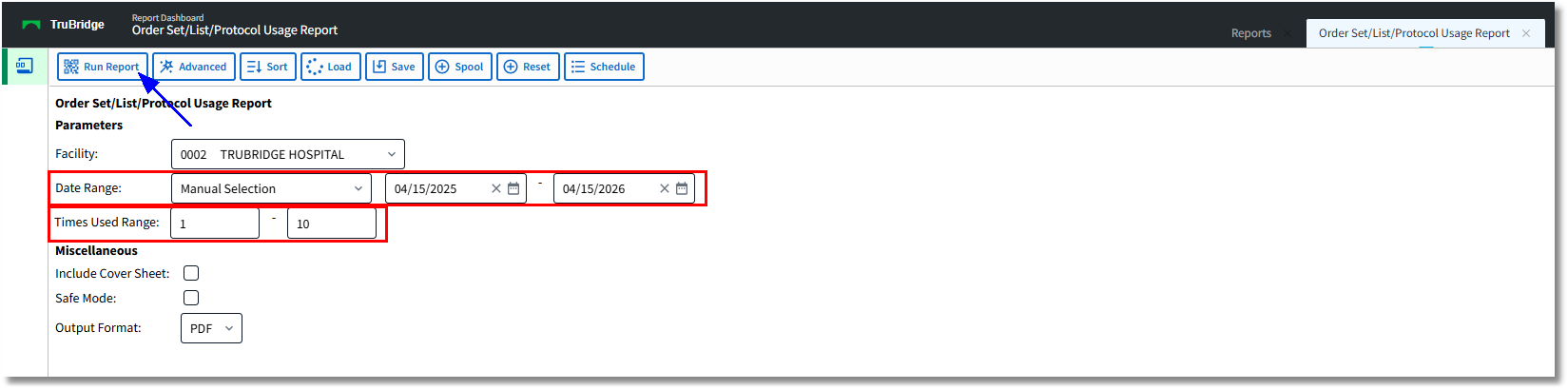
Order Set/List/Protocol Usage Report Parameters
To run the report, double-click the title from the Report Dictionary screen. The report options will display on the Report Writer Report screen.
The report defaults are as follows.
•Parameters
oFacility: For multi-facility sites, select a facility from the drop-down.
oDate Range: Select an option from the Date Range drop-down or keep Manual Selection to enter a custom date range by MM/DD/YYYY - MM/DD/YYYY. Other options in the drop-down include Previous Day, Previous Week, Previous Month, Previous Quarter, Previous Calendar Year, Previous Fiscal Year, Last 7 Days, Last 30 Days, and Last 90 Days.
oTimes Used: Indicate a numeric range for the number of times that the set, list, and protocols were used.
•Miscellaneous
oInclude Cover Sheet: Select this option to include a cover sheet with the report once it has been generated.
oSafe Mode: Select this option to run the report in Safe Mode. (If a report will not build due to bad data, a message will notify the user to run the report using the Safe Mode. When selected, Safe Mode will replace all of the bad characters with a '?' This will allow the report to generate and any bad data may then be seen and corrected from the account level.)
•Output Format: Select the drop-down to indicate the output for the report once it has been generated.
oPDF: Will open the report in the browser or PDF viewer.
oXML: Will open the report in XML format.
oCSV: Will open the report in Microsoft Excel.
oHTML: Will open a view only-version of the report in a separate window.
oMAPLIST: Will open a view-only version within the Report Writer window.
oTXT: Will open a copy of the report in the Notepad application.
Once the parameters are selected, select Run Report from the action bar to generate the report.
The report will generate with the following information:
•Title: Title of Order Set, Order List, or Protocol
•Times Used: The Number of times the Set, List, or Protocol has been used within the defined parameters.
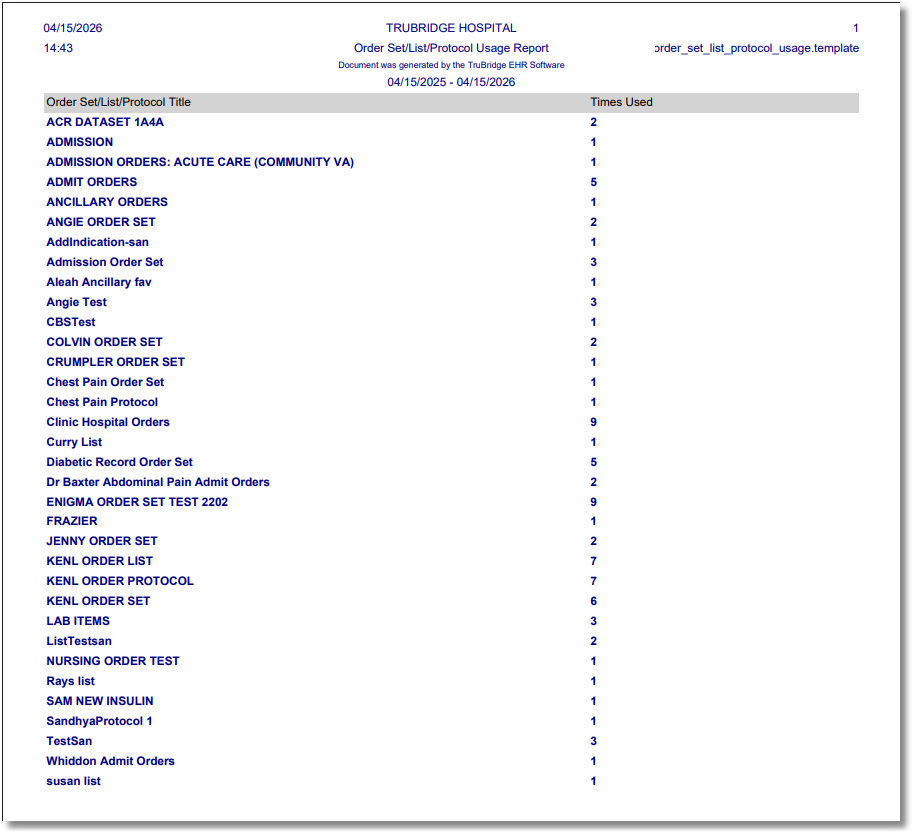
Order Set/List/Protocol Usage Report