|
<< Click to Display Table of Contents >> ChartLink Control Table Page 3 |
  
|
|
<< Click to Display Table of Contents >> ChartLink Control Table Page 3 |
|
Select Hospital Base Menu > Master Selection > Business Office Tables > Maintenance > CL Tables > ChartLink® Control Table > PgDn
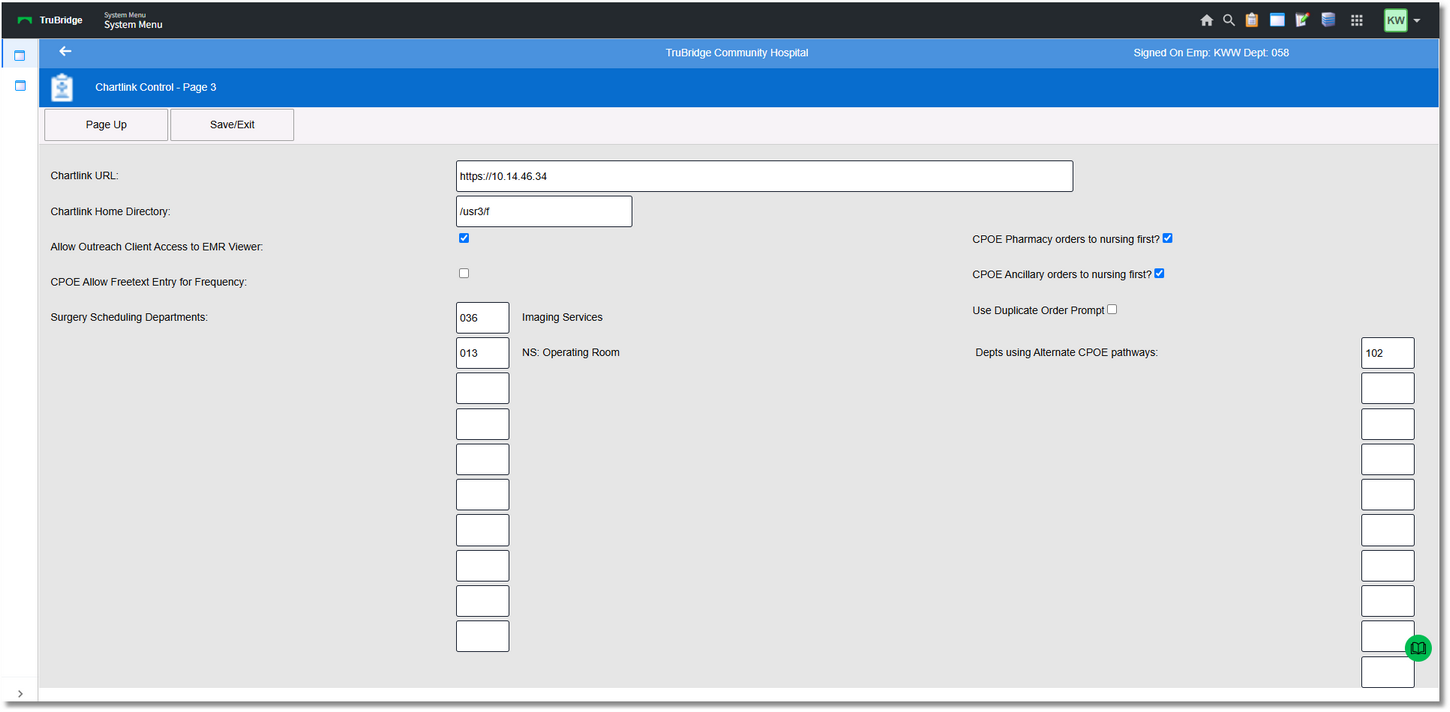
ChartLink® Control Page 3
•ChartLink® URL
▪ Default: Blank
▪Options: Entry of ChartLink® URL
▪Usage: Holds the URL address of ChartLink®
•ChartLink® Home Directory
▪Default: Blank
▪Options: Entry of ChartLink® Home Directory
▪Usage: Holds the Home Directory for ChartLink®
• CPOE Allow Freetext Entry for Frequency:
▪Field no longer valid.
• CPOE Pharmacy orders to nursing first?
▪Default: Blank
▪Options: ? (check mark) for Yes or blank for No
▪Usage: Allows use of an alternate path for CPOE pharmacy orders to flow after signing by a provider.
• CPOE Ancillary orders to nursing first
▪Default: Blank
▪Options: ? (check mark) for Yes or blank for No
▪Usage: Allows use of an alternate path for CPOE ancillary orders to flow after signing by a provider.
•Surgery Scheduling Department
▪Default: Blank
▪Options: Entry of Surgery Scheduling Departments
▪Usage: Input up to 10 department numbers to display the Department Schedule under the Physician Report located on the ChartLink® Whiteboard.
•Departments using alternate CPOE pathways:
▪Default: Blank
▪Options: Allows the designated nursing departments to use a pathway different from the pathway that is listed on page one Pg.1 of the ChartLink Control Table.
▪Usage: To designate the 3-digit nursing department number that will use the selected alternate pathway(s).