|
<< Click to Display Table of Contents >> Description and Usage |
  
|
|
<< Click to Display Table of Contents >> Description and Usage |
|
The Precertification Report will display all appointments within a date range with tasks that require pre-certification information. This report will help determine if the necessary pre-certification information has been gathered and loaded on the Pre-Certification screen within Scheduling.
Precertification Report
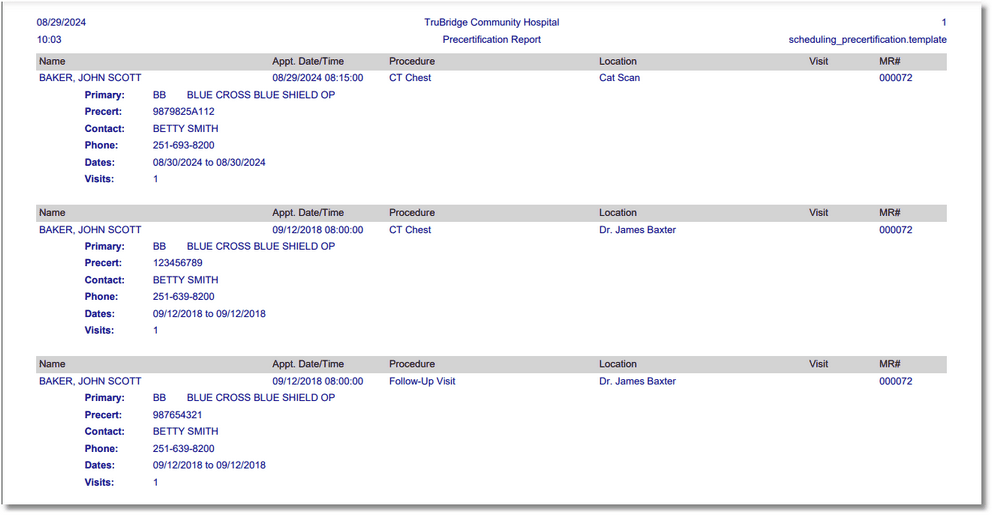
Precertification Report
Listed below is an explanation of each column.
•Name: The patient's name associated with the appointment.
•Appt. Date/Time: The appointment date and time.
•Procedure: The task/procedure for which the appointment was scheduled.
•Location: The location of the appointment.
•Visit: The visit number linked to the appointment. If this is blank, a visit has not been linked.
•MR#: The patient's medical record number associated with the appointment.
•Primary/Secondary/Tertiary: The financial class requiring precertification information.
•Precert: The financial class' precertification number for the appointment.
•Contact: The person to contact regarding the precertification.
•Phone: The phone number of the contact person.
•Dates: The dates of the precertification.
•Visits: The number of allowed visits for the precertification.