|
<< Click to Display Table of Contents >> Medication Report |
  
|
|
<< Click to Display Table of Contents >> Medication Report |
|
The Medication Report contains two types of medication orders: Medication Administration and Undocumented Medication Orders.
•The Medication Administration section lists medication administrations per medication.
•Medications that have not been addressed display in the Undocumented Medication Orders section.
To access the Medication Report, select Medication Report from the MAR action bar.
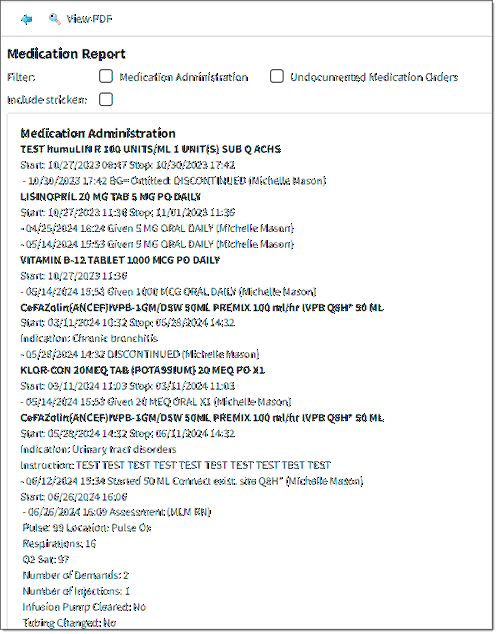
Medication Record
The default display for the Medication Report includes the Medication Administration section and the Undocumented Medication Orders section. Documentation from the entire stay displays for the current visit. The display may be filtered by section.
To filter the display, select the section to be viewed from the Filter by Selected Sections list. Then, select Process. To return to the default display, select Clear Section Filter and then Process.
Amended and removed administrations may be included in the Medication Administration section by selecting the Include stricken check box and then Process. These administrations will display with a strike-through.
Medication Administration Section
The Medication Administration section displays information for each medication based on the order type.
•Non-IV Medications
oOrder Information Line
▪Medication Name
▪Dose
▪Units
▪Frequency
▪Route
oStart/Stop Line
oIndication Line (if required) This will include the indication and, in addition, will also include PRN reason, if given during the order entry process.
oInstruction Line (if documented)
oAdministration/Action Line
▪Date and Time
▪Action: Given/Started, Omitted, or Discontinued
•If the administration is omitted, the omission reason will display after the action.
•Dose, Units, and Site will not display for omitted or discontinued entries.
▪Dose
▪Units
▪Site
▪Reason
▪Comment (also included for PRN medications)
▪Employee Credentials - The system displays the user's name and credentials found in Payroll at the time an administration was carried out instead of the most recent Payroll information.
▪Witness Credentials - The system displays the witness name and credentials listed in Payroll at the time of the administration including PCA medications.
oInformation Line
▪Assessment: Date and Time
▪Action: Assessment and Employee
•IV Medications
oOrder Information Line
▪Medication Name
▪Flowrate
▪Frequency
▪Route
oStart/Stop Line
oIndication Line (if required)
oInstruction Line (if documented)
oAdministration/Action Line
▪Date and Time
▪Action: Given/Started, Omitted or Discontinued
•If the administration is omitted, the omission reason will display after the action.
•Dose, Units, and Site will not display for omitted or discontinued entries.
▪Dose
▪Units
▪Site
▪Reason
▪Comment
▪Employee Credentials
▪Witness Credentials
oAdditional Information Line: Infusion options display chronologically in relation to the administration to which they are associated.
▪Complete Infusion: Date and Time; Action: Complete Infusion, Comment and Employee Credentials
▪Titrate: Date and Time; Action: Titrate, Comment and Employee Credentials
▪Pause Infusion: Date and Time; Action: Pause Infusion, Comment and Employee Credentials
▪Start Infusion: Date and Time; Action: Start Infusion, Comment and Employee Credentials
▪Assessment: Date and Time; Action: Assessment and Employee Credentials
•Diabetic Record Medications
oOrder Information Line
▪Medication Name
▪Frequency: Per Protocol
▪Protocol Frequency
oProtocol Line: Protocol Title
oStart/Stop Line
oAdministration/Action Line
▪Date and Time
▪Blood Glucose Level with units of measure mg/dl or Carbohydrate Count
▪Action: Given/Started, Omitted or Discontinued
•If the administration is omitted, the omission reason will display after the action.
•Dose, Units and Site will not display for omitted or discontinued entries.
▪Dose
▪Units
▪Site
▪Protocol Name
▪Reason
▪Intervention
▪Employee Credentials
▪Witness Credentials
oAdditional Line Information
▪Assessment: Date and Time
▪Action: Assessment and Employee Credentials
•PCA Medications
oOrder Information Line
▪Medication Name
▪Frequency: Per Protocol
oStart/Stop Line
oAdministration/Action Line
▪Date and Time
▪Action: Start PCA, Effective, Ineffective, Bolus, New Syringe, New Protocol or Discontinued
▪Employee Credentials
▪Witness Credentials
o Information Line
▪Assessment: Date and Time
▪Action: Assessment and Employee Credentials
Undocumented Medication Orders Section
The Undocumented Medication Orders section displays order information for each medication based on the order type.
•Non-IV Medications
oMedication Name
oDose
oUnits
oFrequency
oRoute
•IV Medications
oMedication Name
oFlowrate
oFrequency
oRoute
•Diabetic Record Medications
oMedication Name
oFrequency: Per Protocol
oProtocol Frequency
•PCA Medications
oMedication Name
oFrequency: Per Protocol
Select the back arrow from the action bar to return to the MAR or View PDF to generate a PDF document of the on-screen display.
Medication Record Report
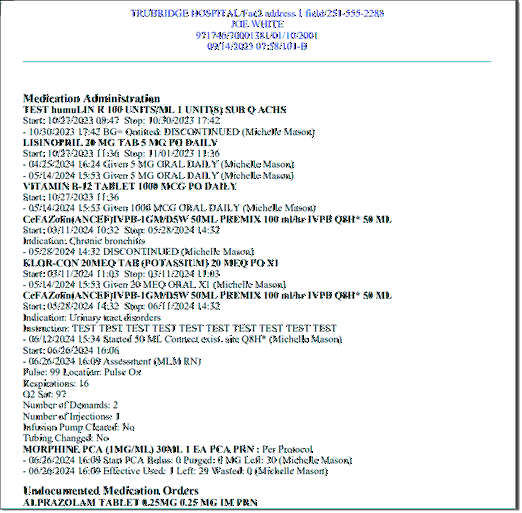
NOTE: The EMAR Medication Report will purge to Clinical History. If the account is NOT in Clinical History at the time the report is opened, it will show the most recently updated information. Once the account purges to Clinical History, the report will become static. The report will automatically display stricken data.
NOTE: If user has the Super Amend behavior control, their amended entries will appear on the Medication Report. See Super Amend Behavior Control.